
TemplateLive
Free income & expense ledger template (Excel)
An income & expense ledger records a shop's money in and out systematically, so you see real profit and prepare data for tax filing. This page offers a free ledger template as both an Excel file with a running-balance formula and monthly totals, and a printable PDF, no email required. It suits online shops, freelancers, and SMEs who want to start simple bookkeeping first, then move to a system that helps more as records grow.
Thai SME ownerLast updated 2026-07-21
Download the template
Free download, no email required
Example document
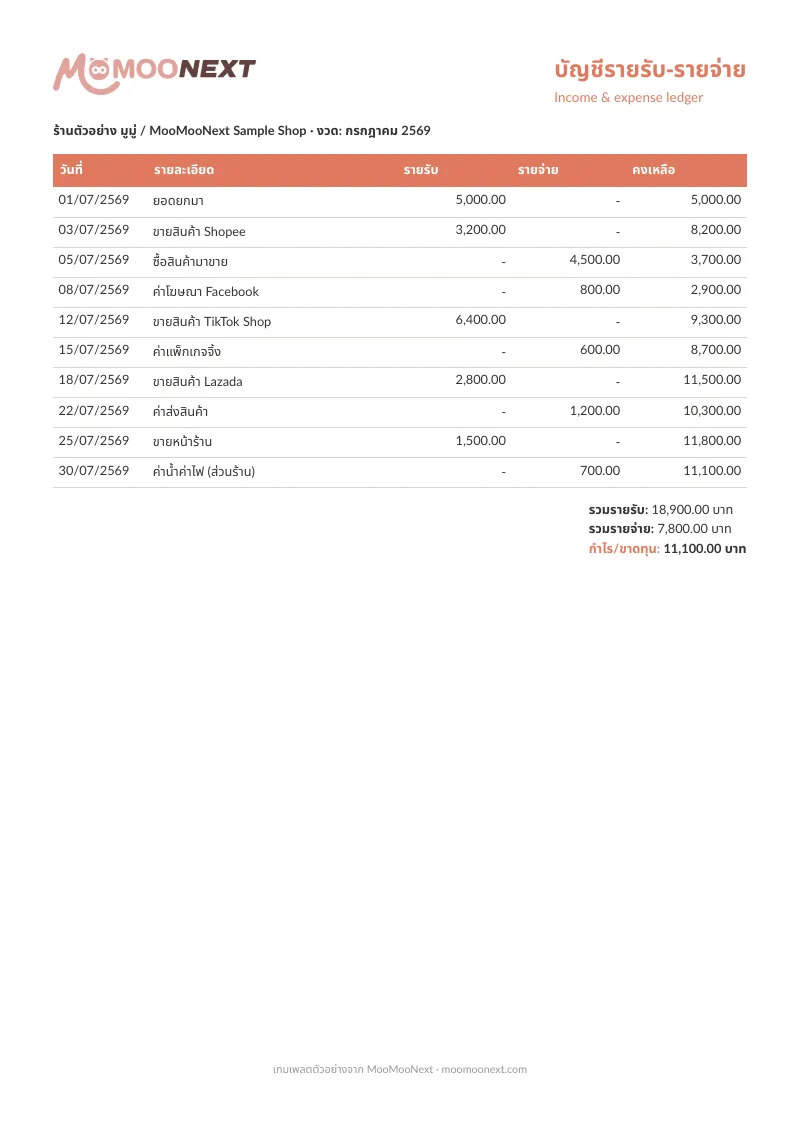
Columns for date, item, income, expense, and running balance with formulas
Monthly income/expense and profit summary
Prepares data for tax filing and accountant handoff
Start in Excel, then let MooMooNext help as records grow
How to keep a shop income & expense ledger
1.Record every time money comes in or out
Enter a row every time money comes in (sales, transfers) or goes out (purchases, ads, shipping), with the date and a short description. The closer to real time you record, the more accurate — do not let entries pile up until you forget what each was.
2.Separate income from expenses clearly
Enter each amount in the income or expense column correctly, and the Excel file computes the running balance for you. Clear separation shows how money flows and lets you calculate profit correctly. For tax-deductible expenses, keep the receipt alongside.
3.Total up at each month-end
At month-end, review the total income, expenses, and profit/loss summarized in the template. It shows how the shop did that month and prepares data for half-year and year-end tax filing. Systematic totals make talking to your accountant much easier.
4.Keep evidence and back up the file
Keep receipts and expense evidence alongside the figures, and back up the file elsewhere in case it is lost or reviewed later. When records grow too many to log by hand, let MooMooNext help record and organize the data for review.
What is the difference between doing it in Excel and using an app?
Excel is flexible and free, good when records are few, but you enter every line yourself and must watch for mistakes. An app reduces repetitive entry, categorizes, and attaches evidence to records. As records grow or you sell on multiple channels, a system saves time and reduces errors. You can start in Excel and move up later.
What should an income & expense ledger record?
Record the date, item description, income or expense amount, and running balance. Online shops should break out sales by channel, platform fees, ads, shipping, and cost of goods, so you can calculate real profit and deduct expenses at tax filing.
Can an income & expense ledger be used directly for tax filing?
A ledger is good source data for preparing a tax filing, but the actual filing must follow Revenue Department rules — choosing an expense method and computing tax by bracket. Use this ledger data together with a tax calculator or an accountant before filing.
Create documents in MooMooNext
Create documents in MooMooNextRelated pages
Beta
AI accounting assistant
Make accounting easier with AI that prepares records from chat, documents, and business context while keeping human review in the workflow.
Read moreLiveFree receipt template (Excel + PDF)
A ready-to-use receipt template — free to download as an editable Excel file and a print-ready PDF to give customers as proof of payment, no email required.
Read more