
TemplateLive
Free receipt template (Excel + PDF)
A receipt is the document a seller issues to a buyer to confirm payment was received. This page offers a free receipt template as both an editable Excel file and a print-ready PDF to send online or on paper — no email required. It suits both individuals and online shops, covering cash receipts and general receipts, with an example and guidance on filling it in.
Thai SME ownerLast updated 2026-07-21
Download the template
Free download, no email required
Example document
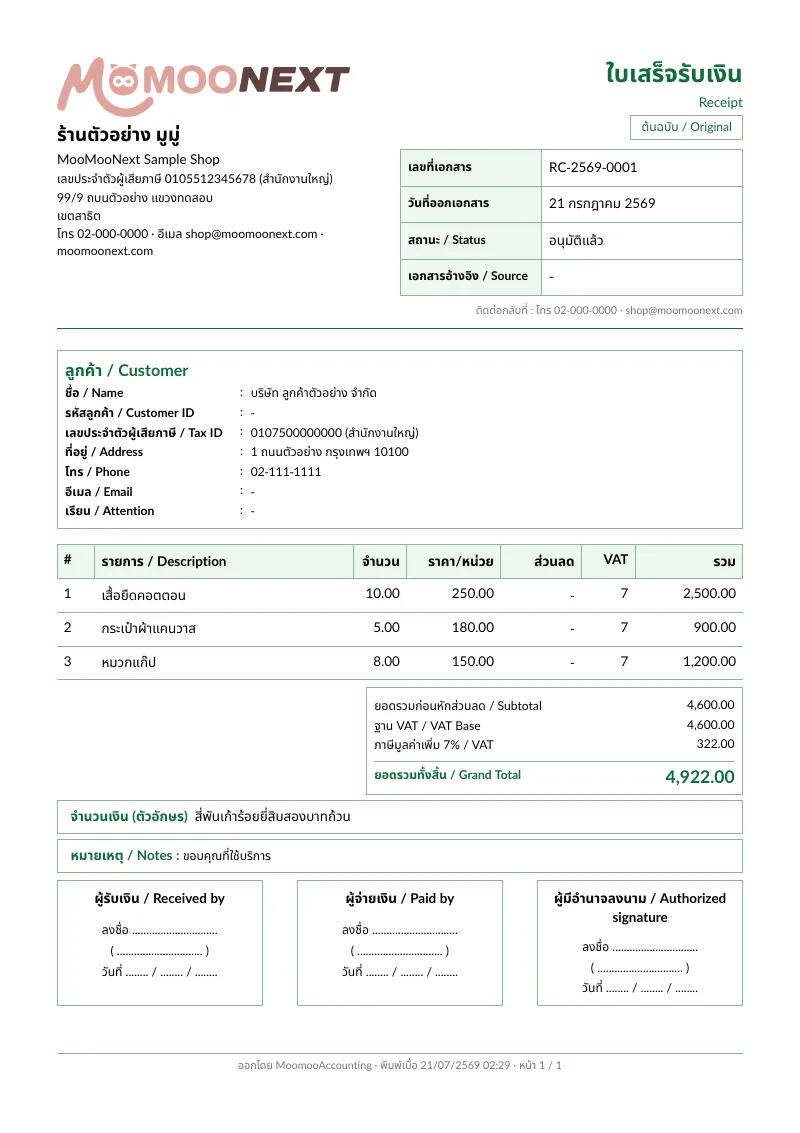
Works for both cash bills and general receipts for online shops
Includes receipt number, date, items, amount, and payment method
Explains the difference between a receipt and a tax invoice simply
Want to issue receipts continuously with history? Create receipts inside MooMooNext
How to issue a receipt correctly
1.Add issuer details and receipt number
Start with your shop or seller name, address, and contact at the top, plus a unique receipt number and the payment date. Sequential receipt numbers make it easy to review income and reconcile against your bank statement at month-end. If you are a juristic entity or VAT-registered, add your tax ID to make the document complete.
2.State the payer and what was paid for
State the customer or payer, then list each item or service paid for with quantity and price, so both sides know which payment this receipt covers. If it is a partial payment or deposit, note clearly which installment it is and how much remains outstanding, to avoid confusion with amounts still to collect.
3.Enter the amount and payment method
State the amount received in both figures and words so they match, then note the payment method — cash, bank transfer, PromptPay, or credit card. For transfers, record the date and receiving bank. Payment-method details make it easy to reconcile with your bank statement and prove the money actually arrived, not just that a price was agreed.
4.Distinguish a receipt from a tax invoice
A receipt confirms payment was received, while a tax invoice is a VAT document under Section 86/4. If you are VAT-registered and must issue a tax invoice too, you can issue a combined "receipt/tax invoice" as long as it includes everything both require by law. If you are not VAT-registered, issue a plain receipt and do not write "tax invoice" on it, so it is not mistaken for a tax document.
5.Sign as payee and keep a copy
Finish with the payee signature or stamp, then keep a copy of the receipt as the seller-side record, whether digital or paper. Keeping copies systematically helps you total sales, prepare data for your accountant, and trace back if there is any question about a payment. For shops issuing many receipts a month, keeping searchable files saves time at month-end.
What is the difference between a receipt and a tax invoice?
A receipt is proof the seller received payment, while a tax invoice is a VAT document under Section 86/4 that VAT-registered businesses must issue for sales. The two can be combined into one "receipt/tax invoice" if it includes everything both require, but if you are not VAT-registered you should issue only a plain receipt.
Can an individual issue a receipt?
Yes. An individual who sells goods or does freelance work can issue a receipt to a customer as proof of payment — you do not need to be a company or VAT-registered. Include the payee, payer, items, amount, date, and signature. A receipt gives both sides matching evidence and supports personal bookkeeping.
Is a cash bill the same as a receipt?
They are close but not identical. A cash bill is usually a short document stating items and the amount received in cash, while "receipt" is a broader term that covers any payment method — cash, transfer, or PromptPay. This template works for both; just state the payment method that actually applied.
How do I fix a receipt issued with an error?
If a receipt has an error, do not just erase or overwrite the numbers on the original, as that looks unreliable. Better to void the original by marking it cancelled and keeping it as evidence, then issue a new receipt with a new number and correct details. If you are VAT-registered and it involves a tax invoice, check the void-and-reissue procedure with the Revenue Department (rd.go.th) to stay compliant.
How long should I keep receipt copies?
Generally, accounting and tax documents should be kept for at least 5 years so they can be reviewed as the law requires. For VAT-registered businesses, tax-invoice-related documents fall under retention rules too. Keep a searchable digital file plus a backup, and confirm the current retention period with the Revenue Department (rd.go.th), since details can vary by business type.
Create documents in MooMooNext
Create documents in MooMooNextRelated pages
Live
What is a tax invoice (ใบกำกับภาษี)?
A tax invoice is a legally required VAT document every VAT-registered seller must issue for each sale, per Section 86/4.
Read moreLiveFree quotation template (Excel + PDF)
A ready-to-use quotation template — free to download as an editable Excel file and a print-ready PDF, no email required.
Read moreLiveFree tax invoice template (Section 86/4)
A Section 86/4-compliant tax invoice template, free in Excel and PDF, with the words "tax invoice," number, seller/buyer details, and a separated VAT line — no email required.
Read moreBetaThai receipt and tax invoice OCR
Extract vendor, date, amount, VAT, and tax fields from Thai documents for accountant review.
Read more