
TemplateLive
Free quotation template (Excel + PDF)
A quotation is the document a seller uses to offer a price for goods or services before a sale is agreed. This page offers a free quotation template as both an editable Excel file you can fill in yourself and a print-ready PDF to send customers directly — no email required. It suits both individuals and online shops, and comes with an example and guidance on filling it in correctly.
Thai SME ownerLast updated 2026-07-21
Example document
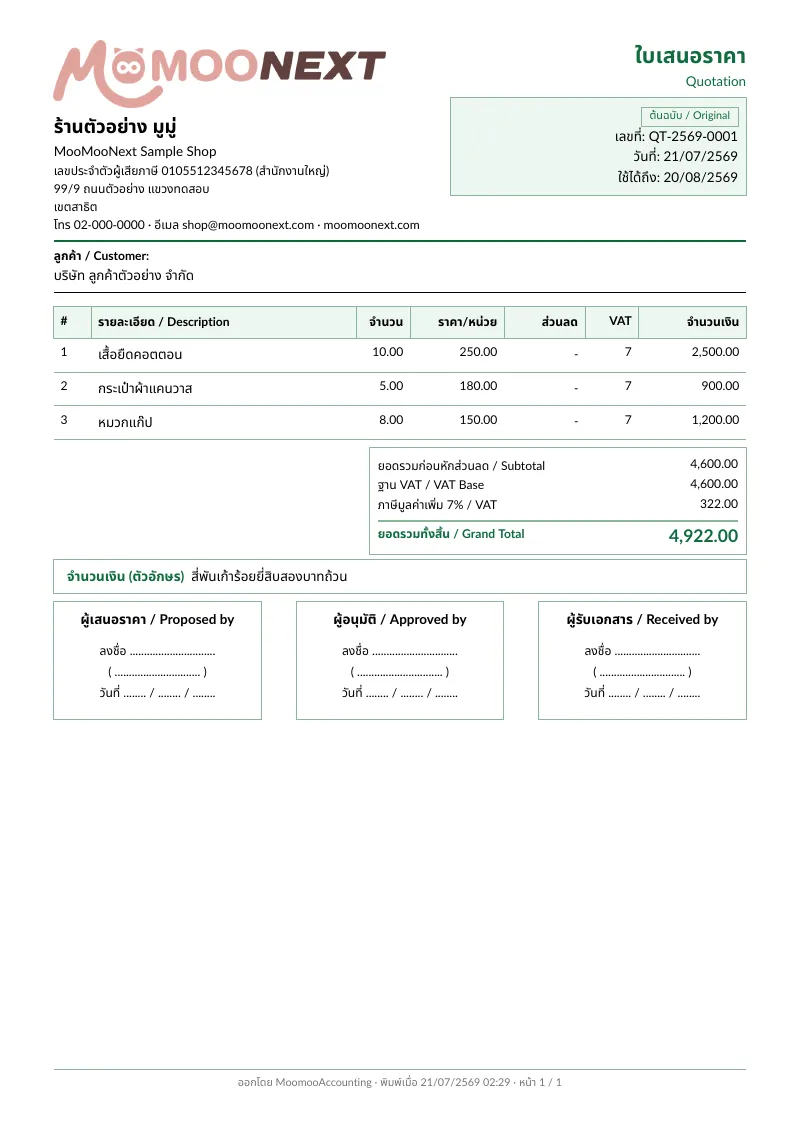
Works for both individuals and online shops selling on Shopee, Lazada, or TikTok Shop
Includes item, price, quantity, total, and an optional VAT line
Comes with a filled example and a price-validity period field
Issuing many quotations? Create quotations inside MooMooNext
How to write a correct quotation
1.Fill in complete seller and buyer details
Start by putting your shop or seller name, address, phone, and email at the top of the quotation. If you are a juristic entity, add your tax ID. Then clearly state the customer or buyer company and contact person, so both sides know who is offering the price and to whom. This makes it easy for the customer to reply and gives a reference for the invoice or tax invoice issued later.
2.List items or services, price, and quantity
List each product or service on its own line with unit price and quantity, then let your spreadsheet formula total each line and the grand total. State clearly whether the offered price includes or excludes VAT. If you are VAT-registered, separate the pre-VAT amount, the 7% VAT, and the net total so the customer does not misread the price and disputes are reduced later.
3.State payment and delivery terms
Spell out payment terms clearly — for example a 50% deposit before work starts and the balance on delivery, or 30-day credit after billing — and include the payment channel, account number, or PromptPay. For delivery, state the timeline, place, and who covers shipping. Terms written into the quotation help both sides agree before the actual sale.
4.Set how long the price is valid
A quotation should state how long the price is valid — for example the price holds for 15 or 30 days from the issue date — because product costs and shipping can change. If the customer agrees after the expiry, issue a fresh quotation with current prices rather than reusing the old one. Stating a validity period protects you from having to sell at a loss when costs rise.
5.Add document number, date, and signature
Finish with a unique quotation number, the issue date, and a signature line for the person issuing it. Numbering documents systematically makes them easy to search and reference later and links them to the invoice or tax invoice that follows. Once the customer agrees, you can issue an invoice or billing note referencing the same items.
What does a quotation for an individual need?
Individuals can issue quotations too — you do not need to be a company. Include the issuer name and contact, the work or items, price, quantity, total, payment terms, and the price-validity date. If you are not VAT-registered, you do not separate VAT; just state clearly that the offered price is the net price.
Does a quotation need to include VAT?
It depends on whether you are VAT-registered. If you are, show the pre-VAT amount, 7% VAT, and net total clearly in the quotation. If you are not registered, you do not add VAT, but you should state whether the offered price is before or after tax so there is no confusion at collection.
Is Excel or Word better for a quotation?
If you have many line items or need to total amounts and VAT, Excel is more convenient because you can use formulas and reduce manual-addition errors. Word or PDF suits a neatly laid-out document you send to a customer without letting them edit it. That is why this page gives both an editable Excel file and a print-ready PDF.
How many days is a quoted price valid?
There is no fixed legal rule — it is a commercial term the seller sets. Common choices are 7, 15, or 30 days from the issue date. Pick a period that matches how fast your costs move: if costs change quickly, keep it short. State the expiry clearly so you retain the right to adjust the price once it passes.
What documents come after a quotation?
Once the customer agrees, the usual Thai B2B sequence is quotation → invoice → billing note → receipt/tax invoice. You issue an invoice or billing note to collect payment referencing the same items, then a receipt and tax invoice once paid. See our other template pages for the receipt and tax invoice templates.
Create documents in MooMooNext
Create documents in MooMooNextRelated pages
Live
What is a quotation (ใบเสนอราคา)?
A quotation offers prices for goods or services before a sale is agreed, listing items, price, terms, and validity period.
Read moreLiveFree invoice template (Excel + PDF)
A ready-to-use invoice template — free editable Excel and PDF for requesting payment for delivered goods or services, no email required.
Read moreLiveFree receipt template (Excel + PDF)
A ready-to-use receipt template — free to download as an editable Excel file and a print-ready PDF to give customers as proof of payment, no email required.
Read moreBetaThai receipt and tax invoice OCR
Extract vendor, date, amount, VAT, and tax fields from Thai documents for accountant review.
Read more